
Thousands of laser settings. Right inside CutVault.
Search a growing library of settings shared by makers and manufacturers across different machines, materials and operations. Find a starting point, review the details, save it to your own presets and get back to making.
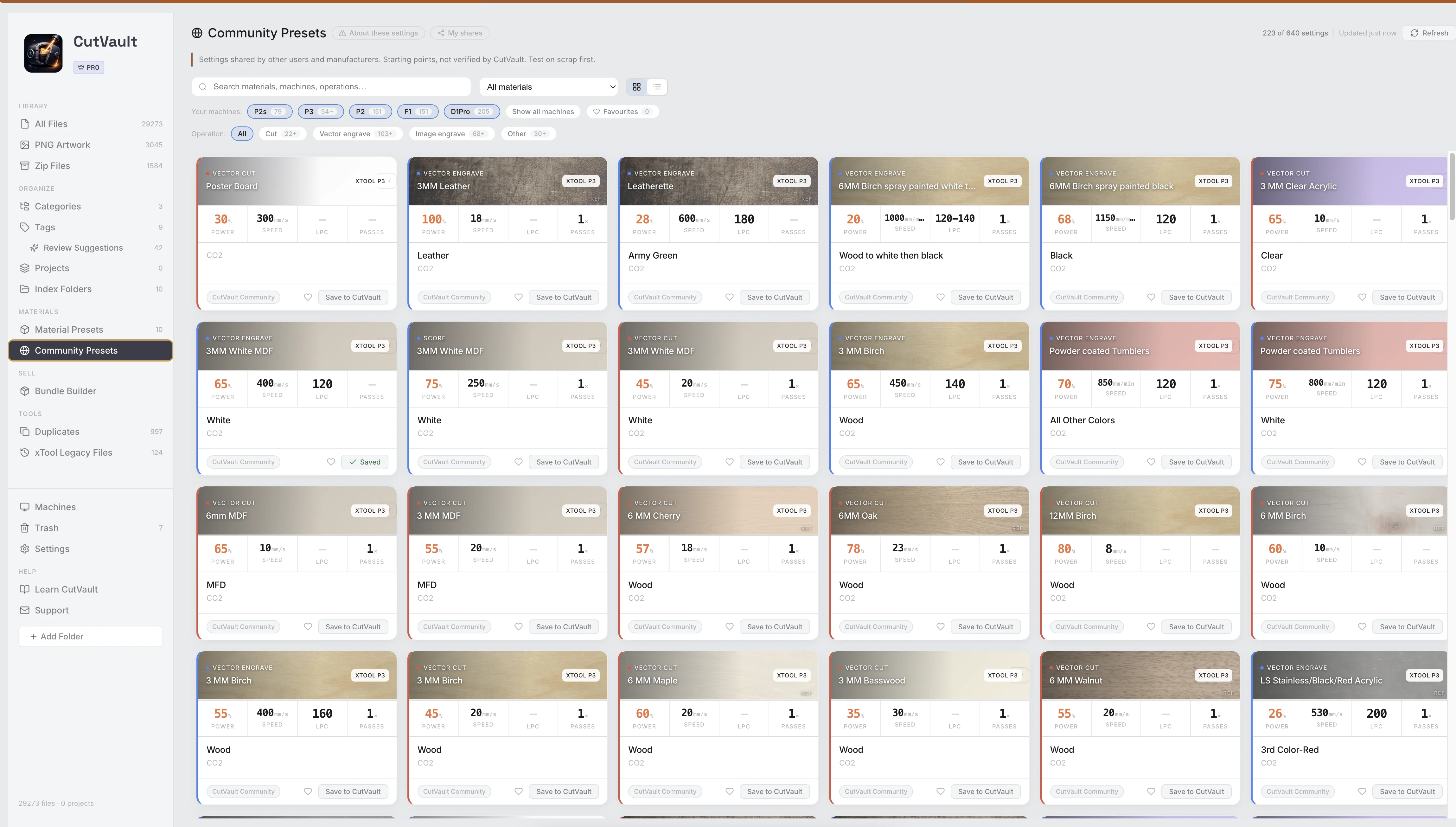
Available right inside CutVault Pro. No separate portal. No access request.
Shared settings are starting points, not guarantees. Machines, materials, lenses and setups vary — test on scrap first.
Every available machine
Example brands from the current library. The number of settings varies by brand and machine.
Find settings for the machine on your bench.
Community Presets can start with the machines you've added to CutVault, so the first settings you see are relevant to your own shop.
Not locked inStart with settings for the machines you own — or choose Show all machines and explore the full library across every available machine.
A large library is useful only when you can narrow it down.
Narrow thousands of settings by machine, material and operation to the few that fit the job.
Machine
45+ machines from 10 brands
Material
25+ material types
Operation
From cut to image engrave
Search the library instead of searching the internet.
Filter Community Presets by machine, material and operation, search the collection, and open a result to see whether it looks like a useful starting point for your job.
See the details before you try it.
Review the material, thickness, finish, machine details, speed, power, passes, line density, DPI and notes where available before deciding whether to test a setting.
Where sharedDetails show when the sharer included them.Not every setting has every detail or a result photo.
Turn a useful starting point into one of your own proven presets.
Save a Community setting into Material Presets, match it to your machine, test it, adjust it if needed and keep the version that works for your shop.
Settings from makers and manufacturers.
Bring useful starting points into one searchable place instead of scattering them across posts, screenshots, manufacturer charts and saved browser tabs.
Manufacturer settings
Reference settings published for supported machines and materials where available.
Maker-shared settings
Settings other CutVault users have chosen to share with the community.
Your own presets
Save useful starting points and build a library around what actually works in your shop.
Take the setting to the machine with you.
Run This Setting gives you a focused view of the important numbers and a short setup checklist when you're ready to test a Community setting.
AdjustedIf you adjust the setting, CutVault can keep the adjusted version while preserving the original for reference.
Share a setting that worked for you.
Send a useful setting from a preset or supported file back to the CutVault Community, with an optional result photo for review.
ReviewedSubmissions are reviewed before they appear publicly, and the sharer's email is not shown.
More ways Community Presets helps.
Start with your own machines
Focus the library around the machines you've added to CutVault.
Browse every machine
Choose Show all machines whenever you want to explore the full library.
Favorite useful settings
Keep settings you want to come back to.
Copy the numbers
Copy a setting as text when you need it somewhere else.
Viewed settings stay available
Previously viewed settings and favorites remain available offline.
Add a result photo
Attach a photo when sharing a setting back to the community.
Track your shares
See the status of every setting you've shared in My Shares.
See it with your own machines
Seven days free, every feature included.
Start free trial →Community settings, without leaving the app.
Browse, review, save and use shared settings inside CutVault — no separate portal, no browser workflow, no access request and no extra monthly subscription.Community Presets are included with CutVault Pro.
Works with these features.
Community Presets connects directly to the rest of your settings workflow.
Material Presets
Save a community setting into your own reusable preset library.
Open Material Presets →Settings
Keep your own job settings, machine context and presets together.
Open Settings →Create Cut File
Use a saved community setting as the starting point for a new job.
Open Create Cut File →Machines
Keep community settings focused around the machines you actually use.
Open Machines →Library
Keep the design and the settings you use around it in the same workspace.
Open Library →Back to overview
See how Community Presets fits into the rest of CutVault Pro.
Homepage →Questions about Community Presets.
One time · No subscription
- 7-day free trialNo credit card
- Mac + WindowsUp to 3 computers
- UpdatesFree updates included
01Will I see settings for my own machines first?
Yes. Community Presets can start with the machines you've added to CutVault, so the first settings you see fit your own shop.
02Can I see settings for machines I don't own?
Yes. Choose Show all machines to browse settings across the full Community library.
03Are Community Presets guaranteed to work on my machine?
No. They are starting points. Machines, materials, lenses and setups vary, so always test on scrap first.
04Do I need a separate account or portal?
No. Community Presets are available inside CutVault Pro. There is no separate portal or access request.
05Is there an extra subscription?
No. Community Presets are included with CutVault Pro and do not require an extra monthly subscription.
06Can I save a setting to my own presets?
Yes. Save a useful Community setting into your own Material Presets and match it to your machine.
07Can I use Community Presets offline?
Settings you've already viewed and your favorites can remain available offline. Browsing and syncing new Community Presets requires an internet connection.
08Can I share my own settings?
Yes. Share from a preset or supported file, optionally add a result photo, and review what will be sent before submitting.
Find your next starting point inside CutVault.
Try CutVault Pro for 7 days, add your machines and browse thousands of settings from makers and manufacturers.
One-time purchase
CutVault Pro is $169 once. No subscription. Use it on up to 3 computers.
- 7-day free trial · No credit card