Use the folders and drives you already have. Your files stay where they are.
Add the top folders you already use on your computer, external drives, USB sticks and SD cards, or synced Google Drive, Dropbox and OneDrive folders. Your designs come into one library without being moved, renamed or uploaded.
From moving files into place to adding the folders you already have.
Years of designs live on the computer, an external drive and a cloud folder, each sorted its own way.
Without CutVault
With CutVault Pro
Add one top folder
- Laser DesignsAdded
- Customer orders
- 2025
- 2026
- Bundles
- Halloween bundle
- Signs
- Customer orders
Every subfolder included. The folders stay exactly as they are.
Add a folder once. Everything inside comes in.
Add the top folder and the supported designs inside it come into the library, however many subfolders deep. New designs saved there later show up on their own.
StandoutNothing is moved or renamedAdding a folder does not move, rename or upload your files. CutVault only changes a file when you ask it to, such as renaming it.
Where your library can live
Every place you keep designs.
Folders on your computer, external drives, USB sticks and SD cards, and the Google Drive, Dropbox and OneDrive folders synced to your computer all work in the same library.
Mounted network locations, such as a NAS, may work depending on your setup, but CutVault does not officially support NAS configurations. More about NAS
Unplug a drive. Nothing is lost.
When a drive is unplugged, CutVault names the folders it cannot reach and says why. Reconnect the drive and its designs are back in the library, with their tags, categories and notes.
See every folder at a glance.
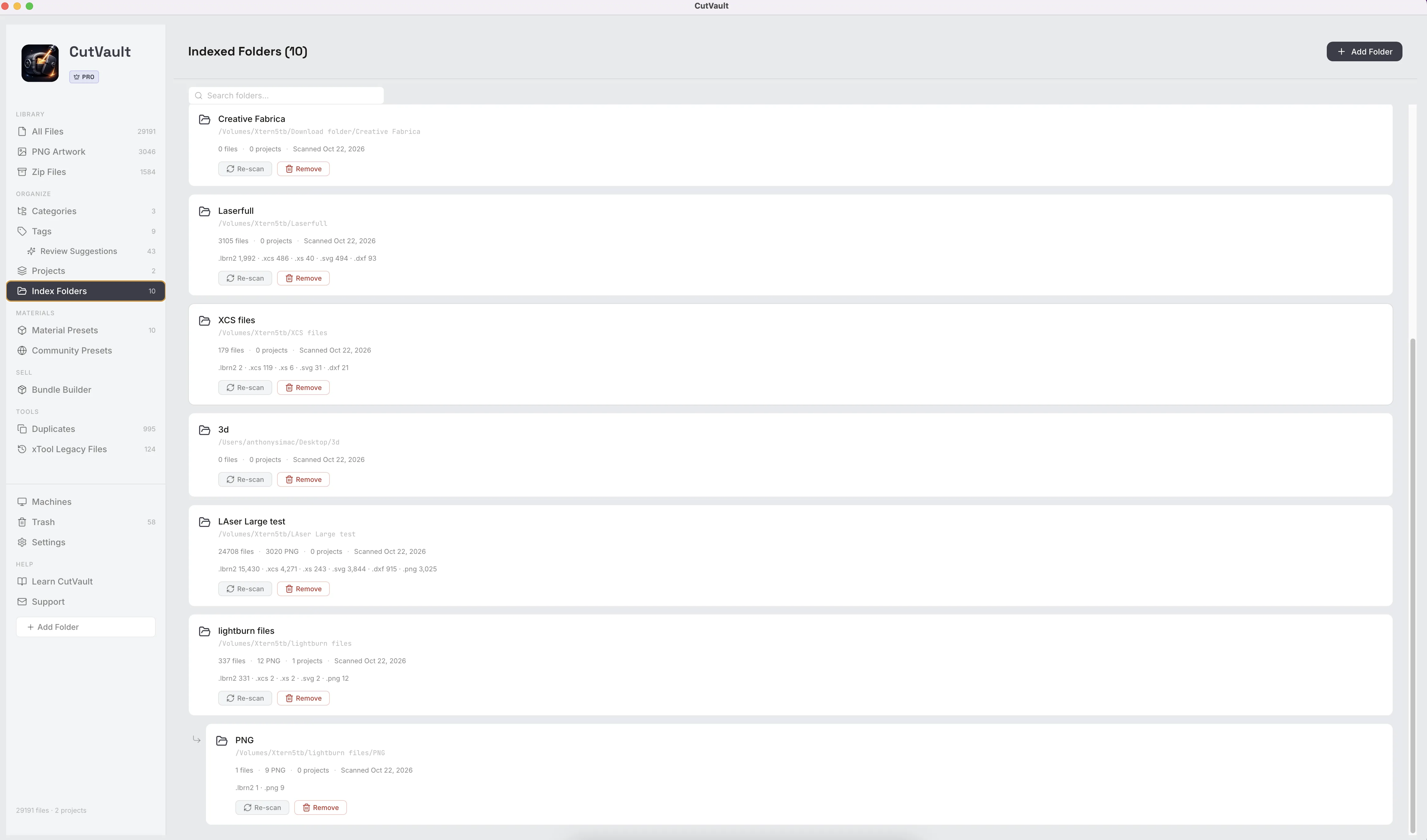
Index Folders lists every folder in your library with its file count, a breakdown by file type and when it was last checked. Check a folder again and CutVault tells you what changed: new files, files no longer there, or up to date.
Add a big library and keep working.
Designs start showing in the library while a large first library is still coming in. A progress screen shows files found and time remaining, and a desktop notification tells you when it is done.
More ways to manage your folders.
Smaller tools for the folders and drives in your library.
Undo a folder
Remove a folder added by mistake in one click.
Cancel while it comes in
Stop a folder that is still being added.
Remove a folder, keep the files
Removing a folder from CutVault leaves every file on your drive.
Missing filter
Show the designs that can no longer be found where they were saved.
PNG Artwork folders
PNG Artwork includes only the folders you choose, so personal photos stay out.
Move to a new computer
Export your library data and import it on the new computer. The design files need to be there too, for example in the same synced folder.
Works with these features.
Go deeper into the CutVault tools that work across your folders and drives.
Library & Search
Every supported design from your folders and drives as a thumbnail, in one library.
Open Library & Search →Search & Filters
Search every folder and drive at once, and filter by folder, machine, type or tag.
Open Search & Filters →Build from Folders
Turn the folders you already sorted into categories, without moving a file.
Open Build from Folders →Duplicates
Find identical copies saved in different folders and drives, and keep one.
Open Duplicates →Zip Files
See inside the design bundles in your folders without unzipping them.
Open Zip Files →CutVault vs Finder and File Explorer
What the same folders look like in CutVault.
Open the comparison →Questions about Folders & Drives.
One time · No subscription
- 7-day free trialNo credit card
- Mac + WindowsUp to 3 computers
- UpdatesFree updates included
01Will CutVault move, rename or upload my files?
No. Your files stay where they are. CutVault only changes a file when you ask it to, such as renaming it from inside the app.
02Which locations can I add?
Folders on your computer, external drives, USB sticks and SD cards, and Google Drive, Dropbox and OneDrive folders synced to your computer.
03Does CutVault work with a NAS?
Mounted network locations, such as a NAS, may work depending on your setup, but CutVault does not officially support NAS configurations. Reliability can depend on network speed, permissions, security settings, sleep behavior and other factors outside CutVault. For the most predictable results, keep your library on local drives, external drives or synced cloud folders.
04What happens if I unplug a drive?
CutVault names the folders it cannot reach. Nothing is lost, and the designs come back when you reconnect the drive.
05Do I have to reorganize my folders first?
No. Add them as they are. To turn your folder layout into categories, use Build from Folders.
06Is CutVault cloud storage?
No. It works with the synced folders on your computer and does not upload your designs. Your design files stay on your computer.
07Is Folders & Drives sold separately?
No. Folders & Drives is included with CutVault Pro. The $169 one-time price is for the complete CutVault desktop app, not for this feature on its own.
Bring every folder and drive. Leave the files where they are.
Try CutVault Pro free for 7 days with the folders and drives you already use.
One-time purchase
CutVault Pro is $169 once. No subscription. Use it on up to 3 computers.
- 7-day free trial · No credit card