See, search and open every design across your folders and drives.
Add the folders and drives you already use, and supported designs appear together in one visual library with thumbnails, file type and machine context. Search by file name, layer names, tags, categories, projects and notes, narrow the results by machine, folder, type or tag, then open the file in LightBurn, xTool software or another app you choose. Your files stay where they are.
Real CutVault libraries range from thousands of files to more than 3 million See sizes ↓
One-time purchaseCutVault Pro is $169 once. No subscription. Use it on up to 3 computers.
- 7-day free trial · No credit card
From “which folder was it in?” to “there it is.”
Without one library, finding a design means remembering where you saved it and what you called it.
Without CutVault
With CutVault Pro
- ComputerLocal folders and drives
- External drivePlug it in, files come with it
- USB / SDCards and sticks
- Synced cloud folderGoogle Drive, Dropbox, OneDrive
One library for every folder and drive.
Add the top folders you already use and CutVault brings the supported designs inside them into one library, including subfolders however deep they go. Add as many folders and drives as you use.
CutVault shows an unplugged drive as offline. Reconnect an offline drive and its library content becomes available again.
Your originals stay where they are. Adding a folder does not move, rename or upload your files.
See Folders & Drives →See every design before you open it.
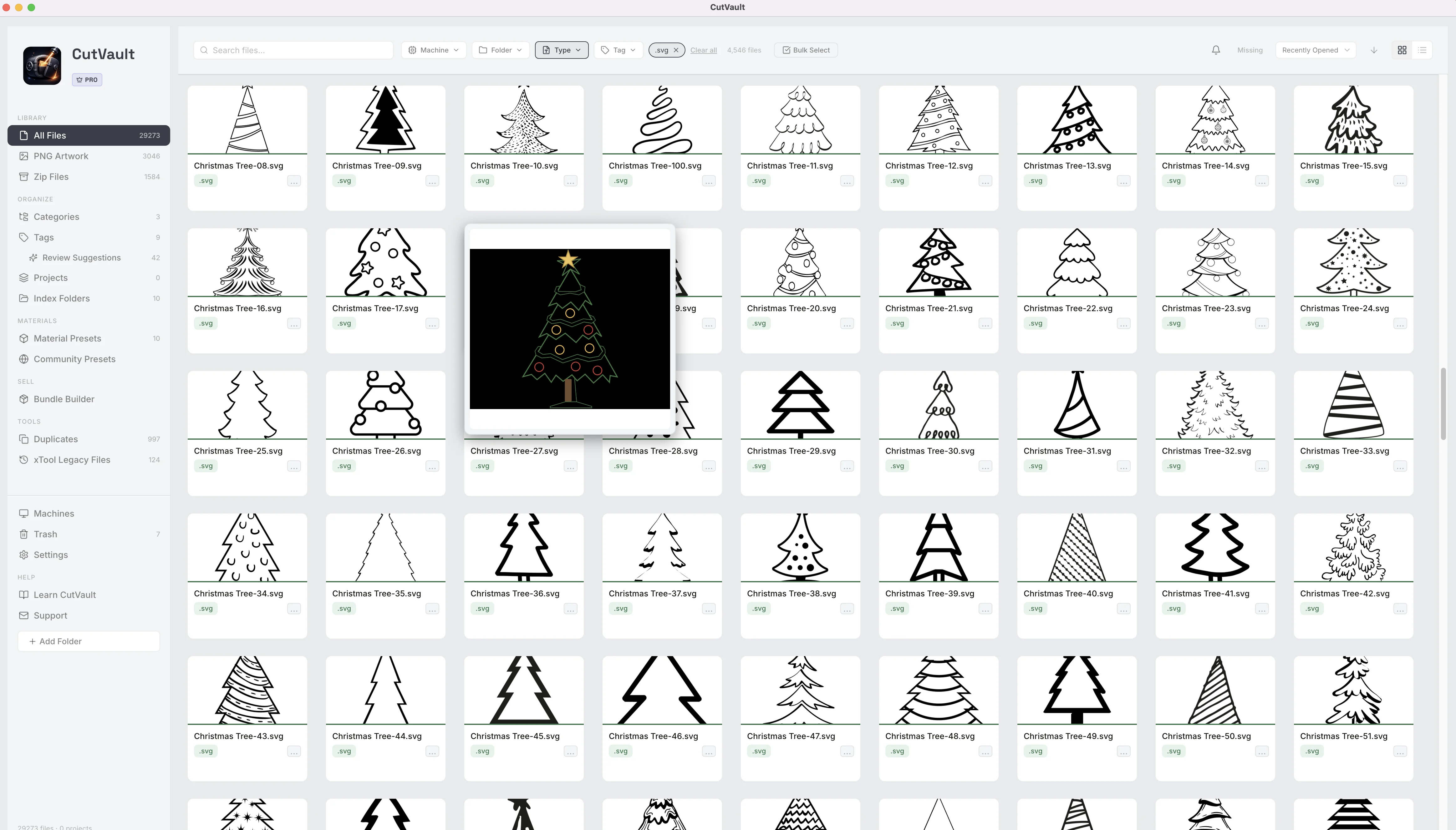
Supported designs appear with thumbnails, file type and machine context so you can recognize what you own without opening files one by one.
List view shows details such as name, type, folder, project, size and date added.
- File name
- Layer
- Tag
- Category
- Project
- Note
Search by what you remember.
Search across every folder at once using more than the file name. CutVault can find designs by layer names, machine, tags, categories, projects and notes.
StandoutFound by a layer nameA file named design_042.lbrn2 can still be found from a layer name you remember.
Narrow thousands of files to a handful.
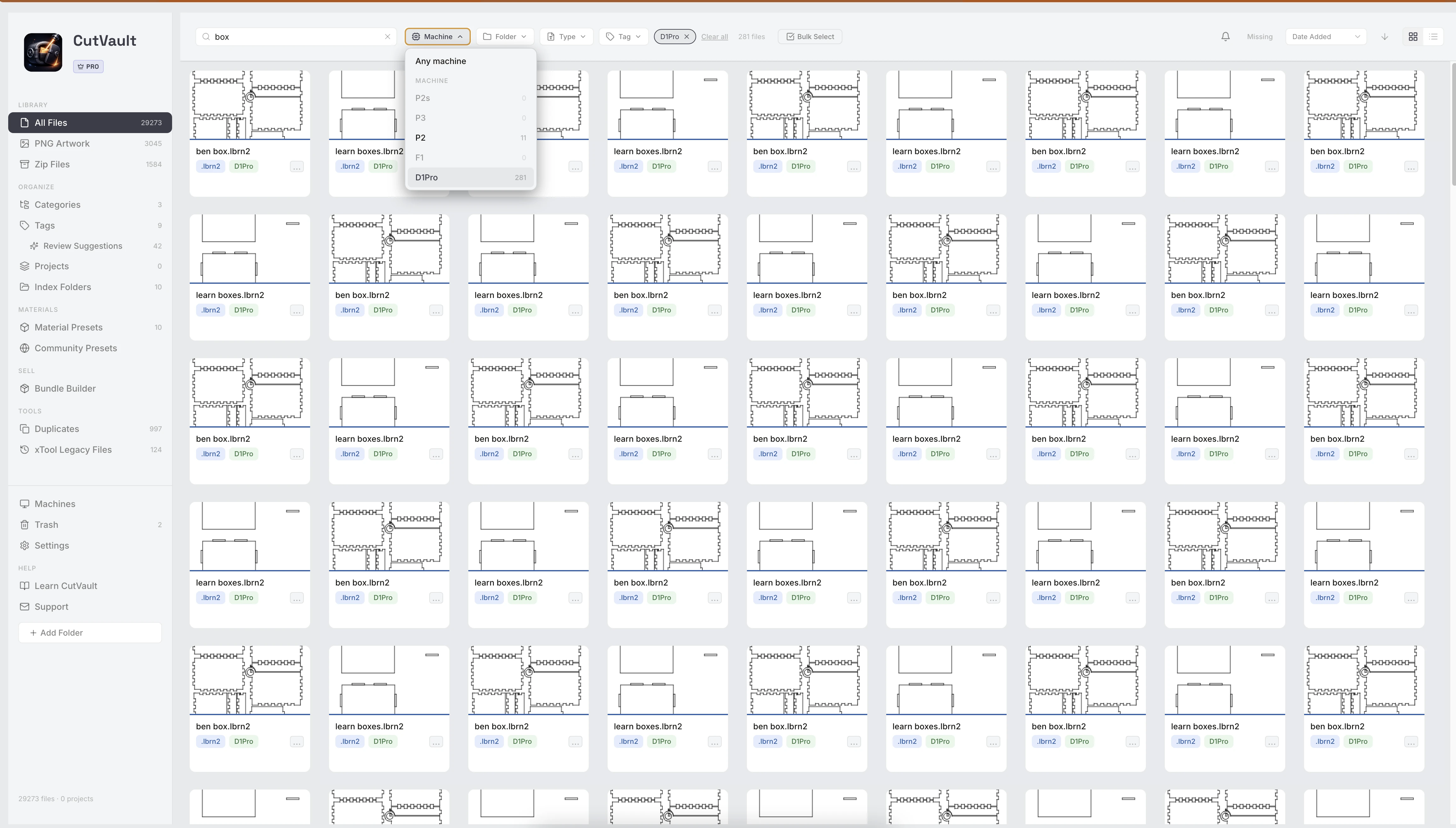
Filter by machine, folder, file type and tag, alone or together, then sort the results so the design you want is near the top.
CutVault remembers your filters, sort and view after restart.
Open it where you make it.
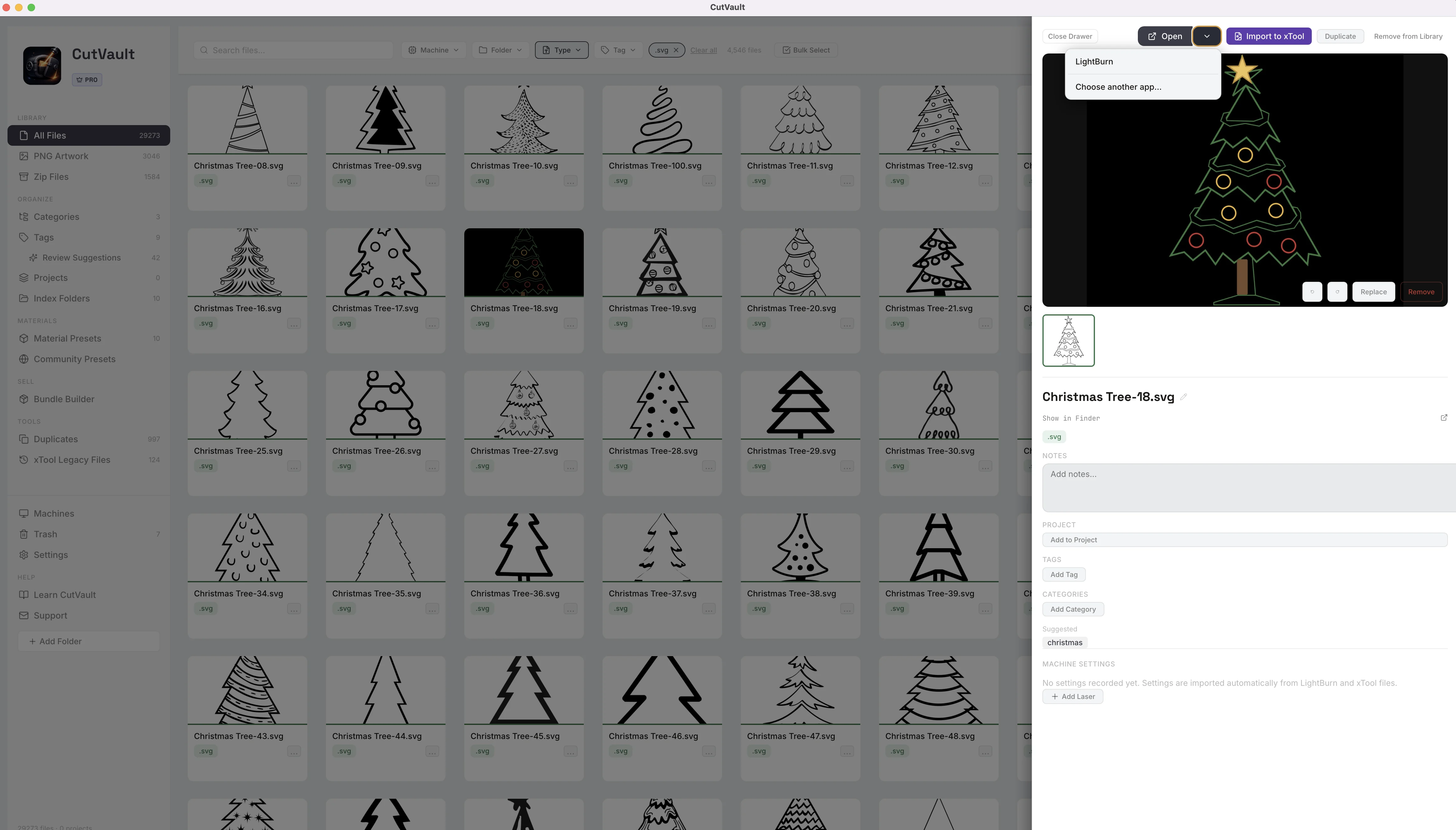
Open LightBurn and xTool project files in their software from the file panel. Open SVG, DXF and PNG artwork in LightBurn, xTool Studio, Inkscape or another compatible application you choose.
Built for libraries that normal folders stop being practical for.
CutVault is already used with libraries ranging from thousands of files to hundreds of thousands — and even collections with more than 3 million files.
Real CutVault library sizes
Sizes of real user libraries. They show real-world scale, not limits.
Large first-time libraries show progress while CutVault builds the library.You can see how it is going and come back when it is ready.
Very large first-time libraries can take time to build, so CutVault shows clear progress while it works through them. Once the library is ready, you can browse, search and filter across the folders and drives you added.
More ways Library & Search helps.
Smaller tools that keep a big library in order and easy to work with.
Missing files
Use the Missing view to find files that are no longer where CutVault expects them.
Index Folders
See each added folder with its file count, type breakdown and last check.
Offline drives
CutVault shows when a drive is unavailable and reconnects the library when it returns.
Bulk Select
Tag, categorize, assign a machine or move many files to CutVault Trash together.
Quick file actions
Rename, duplicate, copy the file path, or add files to a project or category.
Keyboard search
A keyboard shortcut takes you straight to search.
PNG Artwork
Keep engraving images in the PNG Artwork area and choose which ones also appear in All Files.
Dark and light themes
Work in a dark or light theme, set in CutVault Settings.
Look inside ZIP bundles
Browse and preview supported contents in a ZIP before extracting everything. ZIP bundles have their own Zip Files view, separate from All Files.
In All Files
- LightBurn
.lbrn - LightBurn
.lbrn2 - xTool Creative Space
.xcs - xTool Studio
.xs - SVG
- DXF
Their own areas
- ZIP → Zip Files
- PNG → PNG Artwork
Finished photos are kept separately, with the design they belong to.
Works with these features.
Go deeper into the CutVault tools that work with your library.
Search & Filters
Search by layer, tag, project or note, and filter by machine, folder, type and tag.
Open Search & Filters →Folders & Drives
Add the folders and drives you already use, and leave the files where they are.
Open Folders & Drives →Open With
Open designs in LightBurn, xTool software, Inkscape or another app you choose.
Open Open With →Bulk Actions
Tag, categorize, assign a machine or trash hundreds of designs in one action.
Open Bulk Actions →Duplicates
Find identical copies across folders and drives and clear the extras, with one copy always kept.
Open Duplicates →Zip Files
Look inside design bundles, preview what is there and unzip only what you need.
Open Zip Files →Questions about Library & Search.
One time · No subscription
- 7-day free trialNo credit card
- Mac + WindowsUp to 3 computers
- UpdatesFree updates included
01Will CutVault move or rename my files?
No. Your files stay where they are. CutVault only changes a file when you explicitly ask it to, such as renaming it from inside the app. Removing a folder from the library does not delete the files from your drive.
02Where can my files be stored?
Folders on your computer, external drives, USB and SD storage, and locally synced Google Drive, Dropbox and OneDrive folders.
03Will it work with NAS storage?
CutVault can work with NAS storage when the NAS is mounted as an accessible drive on your computer. NAS is not officially supported. NAS setups vary, and reliability can depend on network speed, permissions, security settings, sleep behavior and other factors outside CutVault. For the most predictable results, keep your library on local drives, external drives or locally synced cloud folders.
04Which file types appear in All Files?
LightBurn (.lbrn, .lbrn2), xTool Creative Space (.xcs), xTool Studio (.xs), SVG and DXF. ZIP bundles have their own Zip Files view, and PNG artwork has its own PNG Artwork area.
05Can I search by more than file name?
Yes. You can also search by layer names, machine, tags, categories, projects and notes.
06What happens if I unplug a drive?
CutVault shows the drive as offline. Reconnect it and its library content becomes available again.
07I have hundreds of thousands of files. Will that work?
Yes. CutVault is already used with libraries well over 300,000 files, including collections with more than 3 million files. Very large first-time libraries can take time to build, so CutVault shows progress while it works through them. Once the library is ready, you can browse, search and filter across the folders and drives you added.
08Can I see inside a ZIP without unzipping everything?
Yes. Zip Files lets you browse and preview supported contents before extracting everything. You can unzip everything or only what you need.
09Does CutVault replace Finder or File Explorer?
No. It works alongside them, and you can show a file in Finder or Explorer directly from CutVault.
10Do new files show up automatically?
Yes. New supported files saved into a folder already in your library are picked up by CutVault.
11Is Library & Search sold separately?
No. Library & Search is included with CutVault Pro. The $169 one-time price is for the complete CutVault desktop app.
Add your own folders. See your whole library.
Try CutVault Pro free for 7 days on the folders and drives you already use, then search, filter and open your designs from one place.
One-time purchase
CutVault Pro is $169 once. No subscription. Use it on up to 3 computers.
- 7-day free trial · No credit card